Showing posts with label Adobe. Show all posts

Monday, 28 May 2012

Adobe Ultra CS3

Adobe Ultra CS3

Adobe Ultra is tool for keying, compositing and virtual set work derived for the most part from technology from the Adobe acquisition of Serious Magic.

It’s available as part of Production Premium and Master Collection editions of Adobe CS3. However, on both versions it runs on Windows only -- and unlike with the also-PC-only OnLocation Adobe has chosen not to include it in the Mac version of its suites. This is a shame as Intel Mac users could run it through Boot Camp or Parallels – though this is hardly an ideal solution.
On the first encounter, Ultra looks a fairly slick and comprehensive package. It’s simple to implement a virtual set from the supplied library, then add in some keyed footage or work from a live feed.


Ultra has some proprietary offerings scattered among the Tabs – such as the ability to add shadows and pan and track through a still image or clip. Plus-90 mode allows you to generate footage from a Standard-def camera that can be composited into HD scenes – basically you shoot with the camera rotated at 90 degrees.
The keying tab offers a GPU Boost button for rapid increases to keying speed if you have a powerful enough graphics board – our GeForce880 GTX SLI setup proved the point with almost instantaneous results.
The quality of the input clip is all important – like most compositors Ultra tends to be unforgiving with anything but a perfectly keyed out clip, so results will be better if the background in the input clip is well saturated and well lit to begin with.


However, for clips that don’t deliver a decent key, help is at hand in the form of the Pre-Processing controls on the Colors tab. This offers controls to increase saturation of the background colour to make it more keyable, but can have adverse side effect on the colours in the main subject.
In practice, we had to do quite a bit of fiddling with the colour controls to clean up one such clip, but found the Shrink Matte controls in the Keyer tab to be of significant help too.
Though Ultra is not a unique selling point for the CS3 suites, it offers quick integration with Premiere and After Effects, it’s simple to use and so is definitely worth experimenting with. It would be handy for knocking out a quick pop promo or business presentation, though it probably wouldn’t fit a quality broadcast setup.

Mediafire Link

Password: pakmobileghar

Read More

Adobe Reader 10.1.2

Adobe Reader 10.1.2

Adobe EchoSign
As we promised, we continue to integrate Adobe EchoSign technology into our document services – and now Adobe Reader users will be able to send PDF files to be signed from the application as well as sign documents electronically themselves. The new update makes Adobe Reader the application for getting documents signed electronically. This is just one more step to make it easier than ever for businesses to “seal the deal” and keep up with the demands of a growing mobile workforce. You can read more about how Adobe EchoSign and Reader work together here. 
 
Printing PDF files
We’ve also taken a fresh look at printing PDFs. Printing a PDF file is something that all of us do a lot. In most cases, the PDF file was created in an orientation and page size that makes it very straight forward to print. In some cases, though, you want more control over how it comes out of the printer. For example, you might want to save paper by printing on both sides of a page or including multiple pages of the PDF file on a single piece of paper. Other times you might want to print a page in the PDF file across many pages of paper, so you can assemble them together into a poster. Those and many more options are now much easier to find. When you print from Adobe Reader 10.1.2, you’ll see a new print dialog that makes it much easier to print the way you want to.

New Print Dialog

Exporting PDF files
We all know that sometimes we need to export a PDF file to Word or Excel. We’ve made it easy to do just that directly from Adobe Reader through new integration with our Adobe ExportPDF service. Now when you click on the Export toolbar button the Tools pane will open on the right hand side to display a new Export PDF Files panel. Just select whether you want to convert to Word or Excel and click on Convert. You’ll need to be connected to the Internet and have an Adobe ExportPDF account. You’ll be able to sign up the first time you use it if you don’t already have an account.

New JavaScript Whitelisting Capability
Acrobat and Reader 9.5 and 10.1.2 also add a JavaScript whitelisting capability, allowing IT administrators to lockdown control over which documents can run JavaScript through Privileged Locations. This allows IT desktop managers to turn on JavaScript in Acrobat and Reader for their required workflows. For more information, see the Release Notes Library.


 Mediafire Link

Password: pakmobileghar
Read More

Adobe Premiere Pro CS5

Adobe Premiere Pro CS5

Adobe Premiere Pro CS5-Video Editing Software

Adobe Premiere Pro Cs5 offers breakthrough performance. It is the best video editing software.It allows editing of videos easily. It has lots of features like sound reduction, lighting and many more. Videos shot in dark places can be made visible using Premiere Pro. Many effects i.e Visual effects included in Premiere Pro can give your movie a polished looked. Premiere Pro ranks 1st following the Cyberlink Power Director and Final Cut Pro. The fusion of Aftereffects CS5 and Premiere Pro can make your movie a science-fiction. Lots of of special effects to work with. So I recommend to use Adobe Premiere Pro Cs5 for video editing and production.

Video hardware support
Choose from a wide range of capture cards and other hardware to build the HD, SD, or DV editing system that meets your needs and budget.
10-bit display support
Output and view full 10-bit color without the need for separate video playback hardware thanks to support for the 10-bit DisplayPort on certain NVIDIA Quadro cards (Windows only).

Mediafire Link

Password: pakmobileghar


Read More

Adobe Premiere Pro CS4 Portable

Adobe Premiere Pro CS4 Portable

Review: Premiere Pro CS4

debut on the Mac last year was impressive, especially given the challenges it faced. It not only had to overcome the lackluster reputation of its previous Mac-compatible predecessor, Premiere 6.5, but it also had to reclaim the territory it had ceded to Apple and Avid editing systems during its long absence. Today, Premiere Pro has more firmly established a reputation with Mac-based editors, and this new version will enhance its credibility.
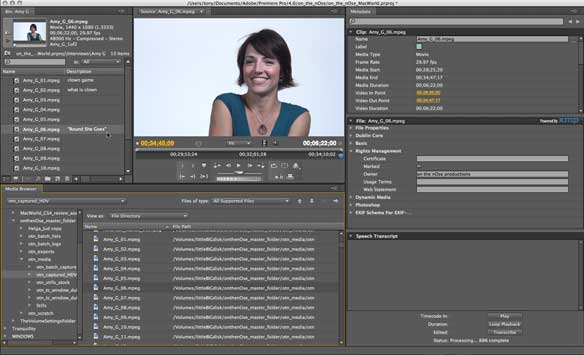
Premiere Pro CS4 rectifies the previous version’s most conspicuous flaws, and introduces some useful new features. In contrast to the previous version, Premiere Pro CS4 includes the same software bundle as the Windows package and can accept a wider range of tapeless formats. A new Media Browser panel, extensive support of metadata, revamped editing controls, blending modes, and batch processing are among its other notable new features.

Package equality

With Creative Suite 3, Adobe nearly achieved parity between the Mac and Windows versions of Premiere Pro. But whereas the Windows version included companion programs Adobe OnLocation (formerly Serious Magic’s DV Rack), and Adobe Ultra (another benefit of Adobe’s acquisition of Serious Magic), the Mac version included only OnLocation—and that could only run via Boot Camp. Creative Suite 4 eliminates the disparity by providing a Mac-native version of Adobe OnLocation CS4, and—surprisingly—by excluding Adobe Ultra from both packages.
The absence of Ultra, a program for keying subjects (such as those shot against a greenscreen) and compositing them with virtual sets, may simply reflect Adobe’s desire to equalize the Mac and Windows versions, albeit at the expense of Windows users. Until Adobe decides to restore Ultra to the package, users can turn to the Keylight effect included with After Effects for professional keying, but will have to look elsewhere for virtual set features.
OnLocation CS4 gives Mac users a valuable production tool that allows them to use a laptop to monitor and capture video in the field. OnLocation not only lets your laptop serve as a field monitor, but also as a portable waveform monitor and vectorscope, instruments used to accurately measure video luminance and chrominance levels. (However, users accustomed to traditional video devices might wish that OnLocation’s waveform monitor didn’t measure the video signal in terms of RGB instead of IRE, the customary metric, named for the Institute of Radio Engineers). You can also use the program to capture video to a hard disc while shooting, bypassing the additional step of capturing footage later from videotape.


Capture disparities

When you do need to capture from tape, you can use Premiere Pro CS4’s Capture panel, which differs little from the previous version. It provides a unified interface for specifying capture settings, controlling a wide range of camcorders and decks, logging, and batch capture. But it also retains some of the previous version’s shortcomings, and represents one of the few areas where differences remain between Premiere Pro for Mac and Windows. On Windows, Premiere Pro’s Scene Detect feature identifies points on the tape where the camera stopped between shots and captures the shots as separate master clips, each linked to a corresponding media file. But on the Mac, Premiere Pro captures a single master clip and creates a subclip for each shot. Both master clips and subclips work fine when it comes to editing. But because the subclips are linked to a single, large master clip and media file, managing media and storage space could be more difficult. And as in the previous version, Premiere Pro for the Mac can’t display HDV footage in the Capture panel; you’ll have to use your camcorder’s built-in screen or an attached monitor instead.

Media browser

For previewing and importing assets into a project, Premiere Pro CS4 incorporates a new Media Browser panel. As part of the Premiere Pro interface, the Media Browser provides a more convenient way to search for footage than using the traditional Import command and dialog box. And by allowing you to sift the items it lists by file type, it makes finding the footage you want even easier. It also lets you view prospective source material in Premiere Pro’s Source Monitor before actually importing the file into the project.

Tapeless formats

The file types you can now import into Premiere Pro CS4 include a wider array of tapeless formats, including P2, AVCHD, XDCAM EX, and XDCAM HD. And Premiere Pro CS4 not only supports the media, but its metadata, as well. Along with the video and audio, Premiere Pro recognizes additional shot information encoded in the file, making it easy to organize and search the footage without intermediate steps.

Metadata

Enhanced support for metadata is one of Premiere Pro CS4’s most prominent new features. A new Metadata panel lets you view and input information about a clip or its source file. The Project panel’s column headings have become just one set of information in an extensive list of metadata categories, or schema. The Rights Management schema, for instance, includes data fields for storing and tracking copyright information. Moreover, metadata can be conveyed throughout the workflow: Metadata logged in OnLocation is transferred to Premiere Pro, and a file exported for the Web can contain metadata that enables you to search the video.

Speech transcription

However useful it may be, it’s hard to get excited about manually logging metadata—or as Adobe calls it, metalogging. But many editors will be thrilled to hear about one of the Metadata panel’s features: automated speech transcription. The speech transcript feature analyzes a selected clip’s audio and transcribes spoken words to the Metadata panel. You can specify one of several languages to transcribe, including English as it’s spoken in four regions of the world: Australia, Canada, the U.K., and the U.S. You can even set it to identify different speakers. When you play the clip, each spoken word is highlighted in the transcript. Conversely, double-clicking a word in the transcript cues the clip to the corresponding frame in the Source panel. To find a particular word in the selected clip, just type it in a search field.


Automated speech transcription could be just the kind of feature Adobe is looking for to lure more editors—particularly those who regularly deal with interview footage—to Premiere Pro CS4. Unfortunately, the feature simply isn’t accurate enough to be very useful in most circumstances. Using the slower, higher quality transcription mode, it took about twice the duration of a clip to analyze its audio. But I would have gladly waited longer for a more accurate transcription. Even slow, carefully articulated speech might produce a transcript that’s largely misinterpreted, creating a kind of bizarre word salad. And informal speech—the kind you’d record in an interview—is seldom enunciated slowly.
I wouldn’t expect any program to produce a completely accurate transcription of natural speech, but a garbled transcript is of limited practical use. And although you can correct the transcript manually, the process can be painstaking. Each word is linked to a specific point in the clip, so you can only select and edit a word at a time, and there’s no way to select the entire transcript or export it to a text editing program. True, even an incomplete transcript could contain enough correct keywords to help you locate certain utterances. And implementing metadata this way has real potential for automating other workflows. But until it becomes more accurate and easy to edit, speech transcription won’t set Premiere Pro apart from its competitors.

Mediafire Link

Password: pakmobileghar


Read More

Adobe Premiere Pro CS3 Portable

Adobe Premiere Pro CS3 Portable

for review:

Create high-quality visual and editorial effects directly within the editing timeline. Generate slow motion and other time-remapping effects with precise keyframe control and real-time feedback. Add color correction, lighting and other effects, audio filters, and more with fast, flexible, built-in tools. Edit footage from multicam shoots with ease and precision.

Comprehensive video-format compatibility
Work with the formats you want. Edit all standard- or high-definition formats, from DV and HDV to HD and beyond (some formats may require additional hardware).
Broad range of supporting hardware and software for Mac and Windows

Create DVD and Blu-ray Discs with Adobe Encore CS3 software, now included with Adobe Premiere Pro CS3. Work with the same Adobe Encore authoring interface and features used to create standard-definition DVDs. Author once, deliver to three formats: automatically convert your high-definition Blu-ray Disc projects into standard-definition DVDs and interactive versions for the web.
Superior integration with other Adobe applications

Make the leading still and motion graphics applications, Adobe Photoshop® and After Effects, part of an efficient post-production workflow. Import and animate Photoshop layers. Automatically create Photoshop files that match the current project’s frame size and aspect ratio. Drag and drop or copy and paste clips and timelines between Adobe Premiere Pro CS3 and After Effects CS3 Professional.
Direct-to-disk recording with included Adobe OnLocation CS3* (Windows only)

Save tape and time by eliminating capture from your production process. Record SD and HD video directly to hard disk using Adobe OnLocation™ CS3 software, included with Adobe Premiere Pro CS3. Instantly review each shot without shuttling tape. Adobe OnLocation automatically detects and flags problems to provide the best results.
Professional on-set monitoring with Adobe OnLocation CS3.


Maximize camera image quality during shoots by using Adobe OnLocation CS3 to quickly calibrate your camera, check levels, and monitor your signal. Use simple tools that function like their hardware equivalents to get results quickly and easily. The virtual reference monitor, waveform monitor, vectorscope, and audio spectrum analyzer help you avoid problems and improve quality when shooting.
Delivery to the web and mobile devices

Make your video viewable on the delivery platforms of today and tomorrow. Export as SWF FLV files. Easily convert DVD projects complete with menus to SWF for web playback. Encode for delivery to cell phones and other mobile devices, and emulate playback on those devices to check playback quality.

Improved editing efficiency

Work faster with powerful and flexible editing tools. Play video with nested audio sequences in real time without rendering. Replace any clip in the timeline with a new clip while preserving the replaced clip’s editing attributes and settings. Use shortcuts to switch between workspace panels and save time.
Accelerated client review and approval with Adobe Clip Notes

Expedite review cycles and avoid miscommunication with Adobe Clip Notes. Embed video into a PDF file, e-mail the file to your client to review and add timecode-specific comments, and then view comments mapped to the Adobe Premiere Pro CS3 timeline


Mediafire Link

Password: pakmobileghar

Read More

Adobe Premiere 6.5 FULL

Adobe Premiere 6.5 FULL


Adobe Premiere has been the long-established leading video editing application (www.adobe.com/premiere) for Windows and Macintosh. For video professionals, and for others ready to step up to a more professional tool, Premiere offers professional features and a clean and robust interface for working on digital video projects. In August 2002, Adobe shipped the latest version, Premiere 6.5, with features including real-time preview, a new Title Designer, and support for MPEG-2 export and DVD authoring.

I had the pleasure of working with Adobe on the Premiere beta program, and was impressed with the level of activity and enthusiasm among the beta users. Premiere has always offered strong support for third-party hardware and software, as well as integration for working with within the Adobe digital video family (After Effects, Photoshop, and Illustrator). Premiere 6.0, introduced in January 2001, added support for DV and Web formats, and significantly enhanced the user interface for both novice and professional users. And now version 6.5 updates Premiere to take advantage of recent developments in hardware and software performance.

What's New

This new version 6.5 is a "point" release, refreshing Premiere to the latest operating systems -- Microsoft Windows XP and Macintosh OS X - and taking advantage of faster processing speeds with features like real-time preview and MPEG encoding. This is not a total rewrite to a major new "7.0" type of release, but instead is an upgrade and enhancement to the existing product. For people already familiar with Premiere, there are no gratuitous changes to the interface. All the existing features still work the same as you are used to; in fact the product ships with the old manual, plus an addendum that describes the new features.


Besides the expanded support for digital video devices and real-time hardware, the 6.5 product includes the new Adobe Title Designer with more than 90 Adobe PostScript fonts, plus support for import and export in the new Windows Media 9 format, and exporting directly to MPEG format for DVD authoring. The product also includes additional goodies such as additional After Effects filters, audio processing tools from TC Works, and updated Sonic Desktop SmartSound Quicktracks.

Real-Time Preview

Perhaps the most visible addition to Premiere 6.5 is support for software real-time preview. As the processing power of desktop and even laptop systems has increased, it is now possible to preview your timeline in software, without needing assistance from a hardware card. You can see the visual effects of your edits immediately, including transitions, effects, and titles, instead of needing to wait to render each time you want to experiment with a change.
Premiere provides built-in presets with real-time preview enabled for DV editing. On recent fast machines, you can enable it for all your projects as well. Premiere scales the preview to take advantage of the available system horsepower, and degrades quality and frame rate gracefully on less powerful machines. With DV projects, you also can view the preview through a FireWire / IEEE 1394 connection, and display it on an external monitor.
However, the availability of real-time preview still does not mean the end of rendering. When you output your final production, you still need to have Premiere render the final output frames in order to generate transitions and effects at full quality and to have the final frames prepared for real-time output to DV or for Print to Video.
Adobe's posted system requirements for real-time preview are a G4 processor (G4 dual recommended) on Mac and a Pentium III 800MHz (Pentium 4 dual processors recommended) on Windows.

Adobe Title Designer

Premiere 6.0 included a simple Title editor for formatting text and graphics with rolls and crawls. Version 6.5 adds the new Adobe Title Designer, a much more sophisticated tool for broadcast-quality title sequences that includes features similar to Adobe Illustrator and InDesign. (The old Title editor is still available for compatibility with old projects.)
The Title Designer includes high-quality text and drawing tools, plus management of styles and properties, and transformations and animation. Besides the basic text formatting options such as fonts, sizes, and colors, it adds typographic controls such as kerning, leading, baseline shift, slant, and rotation. You also can apply edge treatments such as outlining, embossing, and bevels, and control transparency, drop shadows, and gradients. You even can map a texture patterns onto text.

Mediafire Link
 
Password: pakmobileghar


Read More

Adobe After Effects CS3

Adobe After Effects CS3

ANIMATING YOUR MESSAGE

To intrigue potential readers about my latest book, An Artist Empowered, I wanted to replace the static image of the book cover on my website with a more 'e-motionally charged' promotional video that would also include animation. My plan was to also post the video on YouTube, Gather, and other relevant sites.

LET’S MAKE A MOVIE

For starters, After Effects CS3 is not a video editor like Final Cut Express HD, which has many professional tools—from producing feature length films to a three-to-four-minute video describing the merits of my book. While I could choose from various title sequences and effects available with FCE, I felt my talking head approach needed a bit more eye-catching visual interest.
Without a quality presentation, the greatest of content can linger unnoticed. We also live in a media saturated world of the dwindling attention span further compounded by the quest for sound bites, quick edits, text messaging shorthand, and where newsworthy often translates into pandering and sensationalism instead of things that do matter. To be realistic, art, books, and videos, which are my concerns here, and perhaps yours, do compete in the realm of getting attention in a vast sea of look at me.

MOTION OVER TIME

The introductory title sequence and animated interludes that I had in mind for my promotional video would require another power player: Adobe After Effects CS3, a high-end professional compositing, effects, and animation tool. Although you might not have known it, you’ve seen motion graphics and visual effects created with After Effects in film titles (including Hollywood movies), video, DVD, and on the web.
After Effects animations are typically of short duration—from several seconds to fewer than 30. This can be a simple, or a complex undertaking as the possibilities and combinations for innovation are limitless.

THE FAT LADY SINGS

While After Effects incorporates tools you will find in Photoshop, Illustrator, and nonlinear video apps such as Final Cut Express or Adobe Premiere, it is unlike any other image creation or editing program because it works with motion and time in 2D imagery; and in 3D mode you can also control camera angles and depth of field within compelling environments—which, of course, you must also construct.
Finding a metaphor to describe After Effects is a good place to begin.
Antony Bolante, author of After Effects CS3 Professional: Visual QuickPro Guide from Peachpit, describes After Effects as the opera of digital media. This metaphor works for me as opera incorporates the gamut of theatrical elements: acting, drama, music, sound, lighting, speech, art, costume, set design, and, to pull it all together—direction.
After Effects is extremely flexible, allowing users with various needs to create compositions (called comps) from disparate media sources such as Photoshop, Illustrator, QuickTime movies, and 3D modeling programs. AECS3 brings together typography and layout, photography and digital imaging, digital video and audio editing, and 3D animation. Animating elements over time, or motion graphics, is what After Effects is about.

IN-HOUSE TOOLS

While After Effects will happily import files made with other apps, AECS3 offers fabulous tools for creating original work directly from within the program—most notably vector graphics (including the new and innovative Shape Layers feature) and a state of the art typography engine that renders out superb 2D and 3D text effects.

INDEPENDENT FILM

After working with AECS3 for nearly two months, my impression was this: I was an auteur (writer, producer and director) with control over all the elements in my 'Indie' production, from setting the stage, animating my ‘actors’—to such advanced tools as sound, lighting, and camera angles. This precise control over motion and time does demand grasping many new concepts—familiarity with Photoshop and Illustrator provides you with a slight edge.

HEAD’S UP

To say that After Effects is feature rich with tools and options would be an understatement. Learning the intricacies of this app with its many levels, parameters, and transformational properties is a challenge. Instead of feeling overwhelmed, you can get a head’s up by first focusing on the basics until they make sense: for example, as apparent as it might seem, begin by taking the time necessary to familiarize yourself with the application window (AE7 users will still find this interface familiar), which, for all its complexity, is extremely well thought out by its designers.
Getting a handle on the After Effects jargon, which draws heavily from digital video editing (footage, keyframes), plus often-used keyboard shortcuts will also get you up to speed. To easily switch between apps, remember to invoke command > tab. Help from the dropdown menu is comprehensive and can answer many of your questions. Fortunately, there are also excellent tutorial books and videos to jumpstart your adventure in the realm of After Effects. Please see links in the tutorial section of the sidebar.

FIRSTIME USERS

When you add a file (called ‘footage’ by After Effects even if it’s a still image) to the timeline of your comp, After Effects automatically stores it as a layer and provides you with all the transformational properties that can be applied to animate the elements of that particular file (Photoshop, Illustrator, and on QuickTime movies—various effects, trimming a clip or a slip edit).
Simply put, animation is change or motion over time. You animate a layer or an effect on a layer by changing one or more of its transformational properties over time. Basic transformational parameters typically include: position, scale, opacity, and rotation. There are, of course, advanced transformational parameters, especially when working with 3D comps.
Layer properties can then be keyframed in the timeline to create an animation over time. For example, you can animate a layer’s opacity property from 0% to 100% (from one keyframe to another in the timeline) to make the layer fade in. Any property with a stopwatch button to the left of its name in the Timeline panel or Effect Controls panel can be animated. But having the option to animate a property doesn’t mean you have to—in fact, you will find yourself mostly working with a base set of options, and subtly goes a long way in animation.

ARE WE THERE YET?

The final After Effects compositions (you add footage to your comps to create animations) for my book promotional video aren’t yet ready; however, I did want to show you where I'm heading; see the QuickTime movies (1 through 4) in the sidebar; to conserve bandwidth for faster loading, I reduced the file size of each movie with the very handy Sorenson Squeeze with great results.
Text movement is good; however, note the added value of incorporating film and sound (4: Film & Sound); sound quality is as important if not more so than your video. To hear audio in your movie, remember to check the audio output box in the AECS3 output module settings before rendering (to QuickTime, Flash, other format) your composition.
Film & Sound sequence: ocean waves stock footage courtesy of Artbeats; ambient surf and waves sound courtesy of sound-effect.com.
After Effects CS3 is a vast program; my goal here is to introduce you to a few features plus several fundamental concepts of what the program does, which may then also inspire you to get your feet wet. Please see the sidebar for examples.

SUITE INTEGRATION

While introducing new tools and features, the current release of After Effects is as much about seamless workflow with other apps in Adobe’s Production Premium suite—something Adobe has been refining over the years with great results. For example, AECS3 integration becomes especially apparent when importing layers and effects directly from Photoshop Extended and Illustrator CS3 files—another incredibly efficient time saver.

PHOTOSHOP EXTENDED

Photoshop provides a variety of layer styles many of us are already familiar with—such as shadows, glows, and bevels—that change the appearance of a layer. After Effects can preserve these layer styles when importing Photoshop layers. You can also apply layer styles directly in After Effects and then animate their properties.

VIDEO LAYERS

Another significant feature in After Effects CS3 Professional is support for the new Video Layers in PSD files created with Photoshop CS3 Extended. You can create new video layers by adding a video file as a new layer or creating a blank layer.
You can edit or paint on individual video frames to create an animation, add content, or to remove unwanted details. In addition to using any brush tool, you can paint using the Clone Stamp, Pattern Stamp, Healing Brush, or Spot Healing Brush. You can also edit video frames using the Patch tool.
Note: Painting (or using any other tool) on video frames is often called rotoscoping; traditionally, rotoscoping involves the frame-by-frame tracing of live action images for use in animation.
Integration enables you to combine After Effects and Photoshop’s toolsets when working on video rotoscoping and other design tasks. The way this works is that a layered PSD file is saved on disk alongside the movie file it incorporates. When you import the PSD file into After Effects as a composition, it then references the associated movie file for content on the corresponding layer.
In fact, all your AECS3 compositions are constructed solely from links to the source files on your hard drive; this is incredibly effiencient.

VANISHING POINT

Vanishing Point in Photoshop lets you specify 3D sets of planes of perspective onto a 2D image. After importing your PSD file, you can then use those planes as layers to build your 3D comps in After Effects—this feature works quite well for subtle arrangements of perspective and depth—from transforming a 2D image of a building into a 3D model to sliding a flat album label insert onto the shape of a half open CD jewel case.

ADOBE ILLUSTRATOR

In Adobe Illustrator CS3, you can add vector graphics to pre-production plans and create new film and video documents that integrate directly into capture and production functions. The new Crop Area tool in Illustrator CS3 provides a working environment that includes dimensions and units tailored to your output. For video and film, predefined Crop Area characteristics set up your workspace so that it’s automatically prepared for the type of media that will display your designs.
The next step would be to import your Illustrator file (already properly sized for your comp) into After Effects as a Composition. This way, all individual layers in the file remain separate so, if necessary, they can be adjusted or animated separately in After Effects.

ADOBE BRIDGE

Not to be overlooked, Adobe Bridge CS3 acts a convenient go between applications, file organization and sharing, and provides centralized access to your project files, applications, and settings, along with Adobe XMP (Extensible Markup Platform) metadata tagging and searching capabilities.
Bridge also serves as your dynamic environment for viewing animated AECS3 presets on the fly, and then having the option of applying that effect to your composition.

COMPOSITIONS: SPACE AND TIME

An After Effects composition (comp) has spatial dimensions plus a temporal dimension, called duration, or length of time. A composition is where you create all animation, layering, and effects.
When you create a new comp (the comp icon represents the After Effects native file format), you are defining the size, video format, and time duration of your animation. Should you change your mind, After Effects does permit you to come back later to alter your original settings. Every composition you create opens a comp window (which shows how your animation looks) with a corresponding timeline (where you add the source material for your animation as layers for that comp).
Compositions include one or more layers. Any item that you add to a composition—such as a still image, moving image, audio file, light layers, camera layers, or even another composition—becomes a new layer. Simple projects may include only one composition, while elaborate projects may include several compositions to organize large amounts of footage or intricate effects sequences.
As Ko Maruyama often points out in his AECS3 Essentials Total Training video, one handy feature for viewing the timeline or other panels with lots of information is this: To quickly maximize a panel beneath the pointer, press the tilde (~) key. (Do not press Shift.) Press the tilde key again to return the panel to its original size.

SHAPE LAYERS

Still images and animations based on vector graphics are a mainstay of print, web, video, and film design. Previously, many motion graphics artists would create these elements in programs such as Adobe Illustrator and animate them inside After Effects, or use web-oriented software such as Adobe Flash.
Shape Layers is a new, powerful, fully integrated vector graphic creation and animation tool. Based on the vector drawing standards of Illustrator, this exciting new feature simplifies the process of creating and animating shapes. Built-in parametric shapes include polygons and stars as well as ellipses and squared or rounded rectangles; in addition, you can draw your own shapes with the Pen tool. Shape Layers can be used to create anything from simple abstract objects to entire cartoons. You also have full control over fill, stroke, and gradients.

ADD EFFECTS AND ANIMATE YOUR SHAPES

After Effects CS3 boosts vector graphics to the next level by including the ability to animate nearly every parameter and also by providing a wide variety of useful shape effects such as Twist, Pucker & Bloat, Wiggle Paths, and the powerful Repeater effect. A Shape Layer may have multiple shapes, and you have many options for how these shapes are grouped and combined. They can also be used to create stroked paths for underscores and other graphic elements. Shape Layers offer artists, especially for those on deadline work, a quick and easy means for creating sophisticated, beautiful shape-based animations.

PER-CHARACTER 3D TEXT

You can now add a new dimension to your text animation with the power to move and rotate individual characters in 3D space.
The remarkably versatile text engine in After Effects combines the precision typesetting capabilities of Adobe Photoshop and Illustrator with animation tools that provide control over how every line, word, character, or range of characters will scale, rotate, move, fade, skew, change color, track, fade, and blur. AECS3 adds another powerful feature: the ability for each line, word, character, or range of characters to move independently in 3D space—on the X, Y, and Z axis. After Effects ships with hudreds of professionally created presets, including 3D Text Animation Presets. You can also make and save your own presets.
While you can create and animate text inside After Effects, you may find yourself importing a Photoshop CS2 file with text as a composition; with one simple click you can then convert the Photoshop text into After Effects editable text.

PUPPET TOOLS, CLIP NOTES, AND MORE

Designers will also relish the new and innovative Puppet tool. As the name implies, you can use the Puppet tools to quickly add natural motion to raster images and vector graphics, including still images, shapes, and text characters.
The Puppet effect works by deforming part of an image according to the positions of pins that you place and move. These pins define what parts of the image should move, what parts should remain rigid, and what parts should be in front when parts overlap.
Clip Notes allows you to collaborate externally with others to review and comment on projects. New color management capabilities allow artists to maintain precise and predictable color from input to output. And the new Adobe Device Central CS3 software makes it easy to prepare content for delivery on mobile devices—from cell phones to iPods.

LATE FOR AN IMPORTANT DATE

This is, of course, a mere speck of what AECS3 has to offer and what you can accomplish with this unique motion graphics program. With fantastic new animation tools, time-saving features, plus impeccable integration with other Adobe apps, After Effects CS3 is a must have upgrade and an ideal entry release for new users who want to know how far down does the rabbit hole go.


Mediafire Link

Password: pakmobileghar

Read More

Adobe After Effects 6.5

Adobe After Effects 6.5 
Adobe After Effects 6.5 software continues to set new standards in motion graphics and visual effects for film, video, DVD, and the Web. Offering unmatched integration with Adobe Premiere Pro, Adobe Encore DVD, Adobe Audition, Photoshop CS, and Illustrator CS software, After Effects gives you the speed, precision, and power to be visually innovative as you meet production challenges and deliver quality results.
After Effects 6.5 is available in two editions: After Effects 6.5 Standard provides core 2D and 3D compositing, animation, and visual effects tools. After Effects 6.5 Professional includes all of the features in After Effects Standard plus motion tracking and stabilization, advanced keying and warping tools, more than 30 additional visual effects, a particle system, scripting, network rendering, 16-bit-per-channel color, additional audio effects, and more.
Adobe After Effects 6.5 software delivers the speed, precision, and power you need to produce visually innovative motion graphics and effects for film, video, DVD, and the Web.

Work faster, work smarter
OpenGL support
Be more productive with performance optimizations such as OpenGL support for extremely fluid interactive compositing.
Disk caching
Take advantage of disk caching to speed up your interactive work.
Unmatched Adobe integration
Experience unmatched integration with Photoshop CS, Illustrator CS, Adobe Premiere Pro, Adobe Encore DVD, and Adobe Audition software.
Easy to learn and use
Learn as you work with Tool Tips, context-sensitive menus, and comprehensive online Help.
Parenting
Speed up production by defining a parent-child relationship between layers to ensure the child layer inherits all the transformations applied to the parent.
Be visually innovative
2D and 3D compositing environment
Composite and animate in 2D or 3D space using multiple cameras and lights.
Powerful animation and keyframing
Animate layers by setting keyframes at specific points in time for properties such as position, scale, rotation, and opacity. Or save time with Animation Presets.
Unrivaled text animation
Create animated text with unprecedented ease. Type and edit text in the Comp window, instantly apply more than 250 text Animation Presets, and much more.
Extensive visual effects
Create visual effects using more than 150 plug-ins to blur, sharpen, distort, shatter, and more.
Expressions
Create animations without using keyframes by defining Expressions that link the behavior of one layer property to that of another property on any layer in the composition.
Meet production challenges
Integrated vector paint tools
Perform touch-up and rotoscoping with built-in vector paint tools, including the new advanced Clone tool, which makes it easier to handle even complex cleanup tasks.
Comprehensive masking tools
Easily design, edit, and work with masks using flexible auto-tracing options and RotoBzier masks.
Color correction tools
Adjust the color of footage and other layer elements using color correction tools similar to those in Photoshop, as well as Color Finesse for high-end corrections.
Keying and matte tools
Control layer transparency using keying and matte tools.
Rendering and output
Produce professional output more efficiently using the Render Queue, the Advanced 3D Renderer, and more.
Top new features
Advanced Clone tool
Remove unwanted elements from multiple frames more accurately using the advanced Clone tool, which offers five presets and the ability to simultaneously view the source frame as an overlay while you paint.
Disk caching
Take advantage of disk caching to speed up your interactive work.
Animation Presets
Save any combination of animation parameters including transformations, masks, Expressions, effects, and text as Animation Presets to quickly reuse without setting keyframes.
Tighter Adobe integration
Import Adobe Photoshop CS and Illustrator CS files with layers and other attributes preserved. In Windows, copy and paste selected Adobe Premiere Pro clips into After Effects, and create motion menus and buttons for use in Adobe Encore DVD and much more.
Color correction and grain management effects
Adjust the color of footage and other elements with powerful color correction tools, such as Color Finesse. Use grain management tools to add grain to make video look more like film, or remove grain to give film the look of video (Professional edition only).
New special effects plug-ins
Add dramatic effects to your compositions with more than 60 new plug-ins, including Particle World, Light Burst, Light Sweep, and Toner.
New text animation features
Set blend modes between characters, randomize text, write scripts to automate text changes within animations (Professional edition only), and more. Enjoy over 250 professionally designed text Animation Presets.
FireWire video output
Preview your compositions on NTSC and PAL video monitors whether you're using a Windows or a Mac OS X system.
More flexible Motion Tracker
Zero in on any element with the enhanced Motion Tracker, which lets you use as many points as you like or standard one-, two-, and four-point settings; track change in scale or just horizontal or vertical movement; and edit the motion path (Professional edition only).
Enhanced scripting
Use scripts to automate management of the Render Queue as well as production tasks including changes to text and layers, creation of custom palettes, and more (Professional edition only).
System Requirements
Windows
Intel Pentium III or 4 processor (multiprocessor recommended)
Microsoft Windows 2000 with Service Pack 4 or Windows XP Professional or Home Edition with Service Pack 1
128MB of RAM (256MB or more recommended)
150MB of available hard-disk space for installation (500MB or larger hard disk or disk array recommended for ongoing work)
CD-ROM drive
24-bit color display adapter
QuickTime 6.5 software recommended
Microsoft DirectX 9.0b software recommended
For the Render Engine: System requirements are the same as application system requirements.
For OpenGL support: Adobe After Effects supported OpenGL card. For a current list, visit the OpenGL cards page.
Macintosh
PowerPC processor (multiprocessor G5 recommended)
Mac OS X v.10.3.2
128MB of RAM (256MB or more recommended)
150MB of available hard-disk space for installation (500MB or larger hard disk or disk array recommended for ongoing work)
CD-ROM drive
24-bit color display adapter
For the Render Engine: System requirements are the same as application system requirements.
For OpenGL support: Adobe After Effects supported OpenGL card. For a current list, visit the OpenGL cards page.

Mediafire Link
Password: pakmobileghar 
 
Read More

Sunday, 20 May 2012

Adobe Photoshop CS6

Adobe Photoshop CS6

Photoshop CS6 is the latest version of Adobe's flagship editing program.
The first change you'll notice in this release is the revamped interface. Part of this is cosmetic - it's much darker than before - but there are plenty of functional changes, too. Cropping is arguably easier, properties panels fly out, and there are a host of other optimisations dotted around (the Liquify interface is notably simplified, for instance).
Extended content-aware functionality sees the addition of a Content Aware Move, which enables you to draw around an object and move it to another part of the image, while Photoshop intelligently fills in the background. This doesn't always work, unsurprisingly, but a Content Aware Patch option means you can give the program a little assistance, where necessary.
Layer enhancements see Shape Layers replaced by Vector Layers, which can have a stroke and a fill (solid colours, gradients or patterns).
New blur options - Field, Iris and Tilt-Shift - help you to adjust your depth of field and decide exactly which parts of the photo you'd like blurred, and all with convenient on-image controls so you get a full-sized preview of the results.
There are a host of improvements elsewhere. Adobe Camera Raw 7.0 is easier to use, and offers new Shadow and Highlight controls; the Adaptive Wide Angle tool provides more control over lens corrections; image autocorrections are more intelligent, the rewritten 3D engine is faster and offers additional options, and the program's painting tools have been extended with new erodible brushes.


None of this seems quite enough for Adobe, though, who with this release have also greatly extended Photoshop's video functionality. The new video import engine can handle a wider range of formats, including AVCHD; a new Timeline panel presents your video more intelligently; and you can add a separate audio track, drag and drop transitions and fades, and easily cut, splice and preview clips to produce the results you need.
Please note, the download here is for Adobe's Download Manager, which you'll have to use to grab and install the full version of Photoshop for you. This takes a while, though - it's a big 1.2GB download - so you'll need to be patient.

Mediafire Link
 
Password: pakmobileghar


Read More

Adobe Photoshop CS5 ME

Adobe Photoshop CS5


MIDDLE EASTERN VERSION


Make quick image corrections Control color and tone Process images professionally with Photoshop Camera Raw 6 Edit and enhance images intelligently Enjoy an extraordinary painting and drawing toolset Use advanced compositing features Manage your work efficiently Take advantage of a streamlined workflow Enjoy new timesaving tools Extend your reach.


Mediafire Link 


Password: pakmobileghar


Read More

Adobe Photoshop CS5 Extended

Adobe Photoshop CS5 Extended
Adobe Photoshop CS5 Extended software is the ultimate solution for advanced digital imaging, delivering all the editing and compositing capabilities of Photoshop CS5 plus breakthrough tools that let you create and edit 3D and motion-based content. 

What's new in Photoshop CS5 Extended:
For design projects
Go beyond traditional digital imaging. Easily select intricate image elements, such as hair. See space fill in almost magically when you remove image elements. Create 3D logos and artwork by easily extruding text and other 2D graphics.
Extraordinary painting effects - Achieve natural and realistic painting effects with the Mixer Brush, which offers on-canvas color blending; Bristle Tips, which let you create lifelike, textured brush strokes; an onscreen color picker; and more.
Content-Aware Fill - Remove any image detail or object and watch as Content-Aware Fill magically fills in the space left behind. This breakthrough technology matches lighting, tone, and noise so it looks as if the removed content never existed.
Complex selections made easy - Easily select intricate image elements, such as hair, for refinements, compositing, or placing in layout. Eliminate background color around selection edges, and automatically vary selection edges and perfect masks using new refinement tools.
Puppet Warp - Precisely warp or stretch graphics, text, or image elements to create unique new looks for your designs.
Superior HDR imaging - Create photo-realistic or surreal HDR images with unprecedented speed, control, and accuracy. Get better-than-ever results thanks to automatic ghost removal and greater control with tone mapping and adjustments, and even give single-exposure photos the look of HDR.
Efficient workflow - Enjoy productivity and creativity boosts thanks to dozens of features and enhancements requested by Photoshop users. Straighten images automatically, choose colors from an onscreen color picker, adjust the opacity of many layers at once, and more.
Better media management - Easily manage media with more flexible batch renaming, and access your assets in the context of what you're working on by using the customizable Adobe Mini Bridge panel in Photoshop Extended.
3D extrusions with Adobe Repousse - Create 3D logos and artwork from any text layer, selection, path, or layer mask with Adobe Repousse technology. Twist, rotate, extrude, bevel, and inflate your designs.
State-of-the-art raw image processin - Use the Adobe Photoshop Camera Raw 6 plug-in to nondestructively remove image noise while preserving color and detail; add grain to make digital photos look more organic; enjoy more control when performing post-crop vignetting; and more.
Enhanced 3D realism and rich materials - Enhance 3D objects and designs with easy shadow creation, image-based lights, and materials like glass and chrome. Explore with different focus points in your 3D scene by adjusting the range for depth of field.
Faster performance across platforms - Speed up day-to-day imaging tasks and process very large images up to 10 times faster by taking advantage of cross-platform 64-bit support. (Requires a 64-bit-capable computer with a 64-bit version of Mac OS, Microsoft® Windows® 7, or Windows Vista®. Actual performance varies depending on amount of RAM, driver types, and other factors.)
 Mediafire Link

 Password: pakmobileghar
Read More
PAK MOBILE GHAR by Shehroze Ahmed. Powered by Blogger.